> ## Documentation Index
> Fetch the complete documentation index at: https://koreai-ai-for-process-dev.mintlify.app/llms.txt
> Use this file to discover all available pages before exploring further.
# SDK Security
[Back to Web SDK Overview](/ai-for-service/sdk/web-sdk)
The Platform only accepts SDK clients that present valid credentials. You must register your app, obtain Client credentials, and use them to generate a signed JWT for every session.
***
## Authentication Flow
1. Your SDK signs a JWT with the user identity and Client credentials.
2. The Platform verifies the signature using the registered public key or shared secret.
3. Your SDK exchanges the JWT for a **Bearer Token** used in all subsequent API calls.
### JWT Flow
 ***
## JWT Structure
A JWT has three dot-separated parts: `header.payload.signature`
### Header
```json theme={null}
{
"alg": "HS256",
"typ": "JWT"
}
```
**Supported algorithms:**
| Algorithm | Type | Key used for signing | Key used for verification |
| ------------- | ---- | -------------------- | --------------------------------- |
| HS256 / HS512 | HMAC | Secret Key (shared) | Secret Key (shared) |
| RS256 / RS512 | RSA | Private Key (yours) | Public Key (uploaded to Platform) |
### Payload
```json theme={null}
{
"iat": 1466684723,
"exp": 1466684783,
"jti": "1234",
"aud": "https://idproxy.kore.ai/authorize",
"iss": "cs-xxxxxxxxxx-1234",
"sub": "john.doe@example.com",
"isAnonymous": false,
"identityToMerge": "john.doe@example.com"
}
```
### JWT Parameters
| Parameter | Type | Description |
| ------------------------------ | ------- | -------------------------------------------------------------------------------------------------------------------------------------------- |
| `alg` | string | Signing algorithm: `RS256`, `RS512`, `HS256`, or `HS512` |
| `typ` | string | Token type — always `JWT` |
| `iat` | integer | Token issue time in seconds |
| `exp` | integer | Token expiry time in seconds |
| `jti` or `kore_jti` (optional) | string | Unique JWT ID to prevent replay attacks. Use `kore_jti` to bypass pre-populated `jti` values. |
| `aud` | string | Audience — always `https://idproxy.kore.com/authorize` |
| `iss` or `kore_iss` | string | Client ID generated when the app was registered. Use `kore_iss` to bypass pre-populated `iss` values. |
| `sub` or `kore_sub` | string | User identity (email or phone for known users; a unique random ID for anonymous users). Use `kore_sub` to bypass pre-populated `sub` values. |
| `isAnonymous` | boolean | Set `true` for anonymous users. Anonymous users are not persisted on the Platform. Default: `false`. |
| `identityToMerge` | string | Anonymous identity to merge into the known user. See [Passing Mapped Identities](./tutorials/web-sdk.mdx#passing-mapped-identities). |
***
## JTI Validations
When `jti` is included, the Platform enforces:
1. **Expiry ≤ 1 hour** — If violated:
```json theme={null}
{"errors":[{"msg":"error verifying the jwt: if \"jti\" claim \"exp\" must be <= 1 hour(s)","code":401}]}
```
2. **No replay** — If the same `jti` is reused:
```json theme={null}
{"errors":[{"msg":"error verifying the jwt: possibly a replay","code":401}]}
```
***
## Hosting the JWT Generation Service
The Client Secret or RSA Private Key must never be exposed client-side. Host JWT generation as a REST web service:
* For the **Web SDK**: the service is called from the user's browser.
* For **mobile SDKs**: the service is called from the user's device.
Keep the Client ID, Client Secret, and expiry logic server-side. Accept only the user ID from the client.
**Open-source JWT libraries:**
| Language | Library |
| -------- | --------------------------------------------------------------- |
| Node.js | [node-jsonwebtoken](https://github.com/auth0/node-jsonwebtoken) |
| Java | [java-jwt](https://github.com/auth0/java-jwt) |
| .NET | [jwt-dotnet](https://github.com/jwt-dotnet/jwt) |
To register your app and get credentials, see [SDK App Registration](app-registration.mdx).
***
## JSON Web Encryption (JWE)
Use JWE to send sensitive data alongside the user identity in the JWT. Include the data in `secureCustomData` or `privateClaims` — it becomes available in the dialog context at `context.session.UserContext.privateClaims.`.
### JWE Token Structure
A JWE token has five parts: `Header.EncryptedKey.IV.CipherText.AuthTag`
### JWE Header Parameters
| Parameter | Description |
| --------- | ---------------------------------------------------------------------- |
| `alg` | Key wrapping algorithm: `RSA-OAEP` or `RSA1_5` |
| `enc` | Content encryption algorithm: `A128CBC-HS256`, `A128GCM`, or `A256GCM` |
| `kid` | Key ID of the Platform's public key (shown when JWE is enabled) |
| `typ` | Always `JWT` |
**Sample decoded JWE header:**
```json theme={null}
{
"alg": "RSA-OAEP",
"enc": "A128CBC-HS256",
"kid": "k-ffb4hty69-750a-44af-91c1-de0bvxxxx",
"typ": "JWT"
}
```
### Generate a JWE Token
**Steps:**
1. Choose a JWE library for your language (Python: `PyJWT`, Java: `javax.crypto`, Node.js: `node-jose`).
2. Prepare your payload — include sensitive fields under `privateClaims` or `secureCustomData`.
3. Choose encryption algorithms.
4. Use the Platform's public key for asymmetric encryption.
**Python example:**
```python theme={null}
import jwt
payload = {
"sub": "1234567890",
"name": "John Doe",
"iat": 1516239022,
"privateClaims": {
"accountId": "123412512512556",
"fusionSid": "12125125125",
"siteId": "124125125125"
}
}
secret_key = "MySecretKey123"
jwe_token = jwt.encode(
payload,
secret_key,
algorithm='HS256',
headers={"alg": "A256GCM"}
)
print("JWE Token:", jwe_token)
```
### Find the JWE Public Key
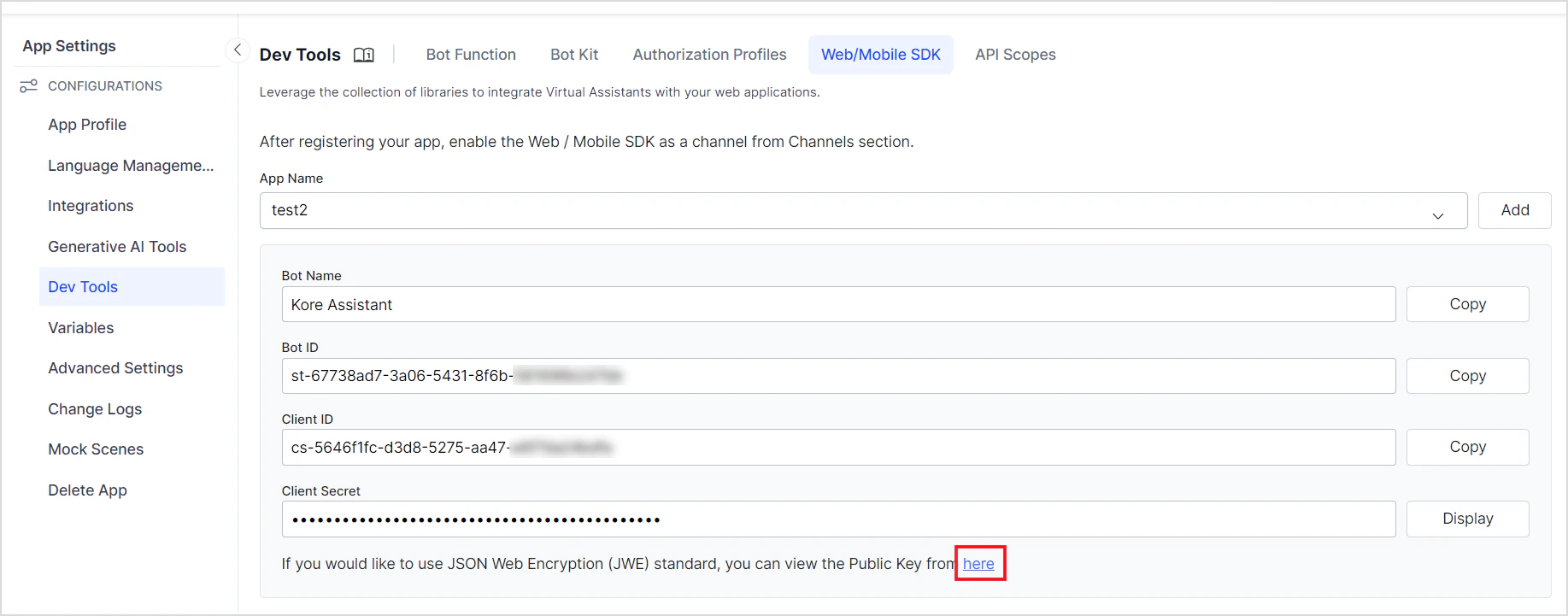
Enable the JWE option when creating an SDK app. The public key is displayed in JWK format.
***
## JWT Structure
A JWT has three dot-separated parts: `header.payload.signature`
### Header
```json theme={null}
{
"alg": "HS256",
"typ": "JWT"
}
```
**Supported algorithms:**
| Algorithm | Type | Key used for signing | Key used for verification |
| ------------- | ---- | -------------------- | --------------------------------- |
| HS256 / HS512 | HMAC | Secret Key (shared) | Secret Key (shared) |
| RS256 / RS512 | RSA | Private Key (yours) | Public Key (uploaded to Platform) |
### Payload
```json theme={null}
{
"iat": 1466684723,
"exp": 1466684783,
"jti": "1234",
"aud": "https://idproxy.kore.ai/authorize",
"iss": "cs-xxxxxxxxxx-1234",
"sub": "john.doe@example.com",
"isAnonymous": false,
"identityToMerge": "john.doe@example.com"
}
```
### JWT Parameters
| Parameter | Type | Description |
| ------------------------------ | ------- | -------------------------------------------------------------------------------------------------------------------------------------------- |
| `alg` | string | Signing algorithm: `RS256`, `RS512`, `HS256`, or `HS512` |
| `typ` | string | Token type — always `JWT` |
| `iat` | integer | Token issue time in seconds |
| `exp` | integer | Token expiry time in seconds |
| `jti` or `kore_jti` (optional) | string | Unique JWT ID to prevent replay attacks. Use `kore_jti` to bypass pre-populated `jti` values. |
| `aud` | string | Audience — always `https://idproxy.kore.com/authorize` |
| `iss` or `kore_iss` | string | Client ID generated when the app was registered. Use `kore_iss` to bypass pre-populated `iss` values. |
| `sub` or `kore_sub` | string | User identity (email or phone for known users; a unique random ID for anonymous users). Use `kore_sub` to bypass pre-populated `sub` values. |
| `isAnonymous` | boolean | Set `true` for anonymous users. Anonymous users are not persisted on the Platform. Default: `false`. |
| `identityToMerge` | string | Anonymous identity to merge into the known user. See [Passing Mapped Identities](./tutorials/web-sdk.mdx#passing-mapped-identities). |
***
## JTI Validations
When `jti` is included, the Platform enforces:
1. **Expiry ≤ 1 hour** — If violated:
```json theme={null}
{"errors":[{"msg":"error verifying the jwt: if \"jti\" claim \"exp\" must be <= 1 hour(s)","code":401}]}
```
2. **No replay** — If the same `jti` is reused:
```json theme={null}
{"errors":[{"msg":"error verifying the jwt: possibly a replay","code":401}]}
```
***
## Hosting the JWT Generation Service
The Client Secret or RSA Private Key must never be exposed client-side. Host JWT generation as a REST web service:
* For the **Web SDK**: the service is called from the user's browser.
* For **mobile SDKs**: the service is called from the user's device.
Keep the Client ID, Client Secret, and expiry logic server-side. Accept only the user ID from the client.
**Open-source JWT libraries:**
| Language | Library |
| -------- | --------------------------------------------------------------- |
| Node.js | [node-jsonwebtoken](https://github.com/auth0/node-jsonwebtoken) |
| Java | [java-jwt](https://github.com/auth0/java-jwt) |
| .NET | [jwt-dotnet](https://github.com/jwt-dotnet/jwt) |
To register your app and get credentials, see [SDK App Registration](app-registration.mdx).
***
## JSON Web Encryption (JWE)
Use JWE to send sensitive data alongside the user identity in the JWT. Include the data in `secureCustomData` or `privateClaims` — it becomes available in the dialog context at `context.session.UserContext.privateClaims.`.
### JWE Token Structure
A JWE token has five parts: `Header.EncryptedKey.IV.CipherText.AuthTag`
### JWE Header Parameters
| Parameter | Description |
| --------- | ---------------------------------------------------------------------- |
| `alg` | Key wrapping algorithm: `RSA-OAEP` or `RSA1_5` |
| `enc` | Content encryption algorithm: `A128CBC-HS256`, `A128GCM`, or `A256GCM` |
| `kid` | Key ID of the Platform's public key (shown when JWE is enabled) |
| `typ` | Always `JWT` |
**Sample decoded JWE header:**
```json theme={null}
{
"alg": "RSA-OAEP",
"enc": "A128CBC-HS256",
"kid": "k-ffb4hty69-750a-44af-91c1-de0bvxxxx",
"typ": "JWT"
}
```
### Generate a JWE Token
**Steps:**
1. Choose a JWE library for your language (Python: `PyJWT`, Java: `javax.crypto`, Node.js: `node-jose`).
2. Prepare your payload — include sensitive fields under `privateClaims` or `secureCustomData`.
3. Choose encryption algorithms.
4. Use the Platform's public key for asymmetric encryption.
**Python example:**
```python theme={null}
import jwt
payload = {
"sub": "1234567890",
"name": "John Doe",
"iat": 1516239022,
"privateClaims": {
"accountId": "123412512512556",
"fusionSid": "12125125125",
"siteId": "124125125125"
}
}
secret_key = "MySecretKey123"
jwe_token = jwt.encode(
payload,
secret_key,
algorithm='HS256',
headers={"alg": "A256GCM"}
)
print("JWE Token:", jwe_token)
```
### Find the JWE Public Key
Enable the JWE option when creating an SDK app. The public key is displayed in JWK format.
 ### Verify and Decrypt a JWE Token
**Python example:**
```python theme={null}
import jwt
jwe_token = "eyJhbGciOiJSUzI1xxxxx..."
jwe_public_key = {
"e": "AQAB",
"kid": "de668337-....-5778944f9630",
"kty": "RSA",
"n": "rdqXc48aW...uNMSdIgn"
}
try:
decoded_payload = jwt.decode(
jwe_token,
jwe_public_key,
algorithms=['RS256'],
options={"verify_signature": True, "decrypt": True}
)
print("Decoded Payload:", decoded_payload)
except jwt.ExpiredSignatureError:
print("JWE Signature has expired.")
except jwt.DecodeError:
print("Invalid JWE Signature or Decryption failed.")
```
For the full JWE specification, see [RFC 7516](https://tools.ietf.org/html/rfc7516).
***
Built with [Mintlify](https://mintlify.com).
### Verify and Decrypt a JWE Token
**Python example:**
```python theme={null}
import jwt
jwe_token = "eyJhbGciOiJSUzI1xxxxx..."
jwe_public_key = {
"e": "AQAB",
"kid": "de668337-....-5778944f9630",
"kty": "RSA",
"n": "rdqXc48aW...uNMSdIgn"
}
try:
decoded_payload = jwt.decode(
jwe_token,
jwe_public_key,
algorithms=['RS256'],
options={"verify_signature": True, "decrypt": True}
)
print("Decoded Payload:", decoded_payload)
except jwt.ExpiredSignatureError:
print("JWE Signature has expired.")
except jwt.DecodeError:
print("Invalid JWE Signature or Decryption failed.")
```
For the full JWE specification, see [RFC 7516](https://tools.ietf.org/html/rfc7516).
***
Built with [Mintlify](https://mintlify.com).